
Your Name on Every Email
Swap the free address for you@yourcompany.ca.
Clients see your business name on every quote, invoice, and reply. Ad-free email on your own domain, with one shared storage pool and a low price per mailbox, hosted in Canada.
One Storage Pool, Every Mailbox You Need
Choose the storage your business needs, then set how many mailboxes share it. Every plan includes webmail, spam filtering, and email authentication.
Email Starter
For freelancers, sole proprietors, and anyone who wants a professional address on their own domain.
25 GB shared storage Up to 5 GB per mailbox
for 1 mailbox
- Due todayCovers 12 months
- $33.52
- Then every yearRegular rate, $3.99/mo
- $47.88
Plan $3.99/mo includes 1 mailbox. Each extra mailbox $0.99/mo.
Every mailbox can use its full 5 GB
- 25 GB NVMe storage pool, shared by your mailboxes
- Up to 5 GB per mailbox
- Up to 25 mailboxes
- Roundcube webmail at mail.yourdomain
- Works with Outlook, Apple Mail, and phones (IMAP, POP3, SMTP)
- Rspamd spam and phishing filtering
- Unlimited forwarders, catch-all, and out-of-office replies
- SPF and DKIM set up for you
- Free SSL for webmail and mail connections
- Daily backups with self-service restore
- Free migration from your current provider
Email Business
For growing teams and professional offices that need an address for everyone.
250 GB shared storage Up to 30 GB per mailbox
for 1 mailbox
- Due todayCovers 12 months
- $125.92
- Then every yearRegular rate, $14.99/mo
- $179.88
Plan $14.99/mo includes 1 mailbox. Each extra mailbox $0.99/mo.
Every mailbox can use its full 30 GB
Everything in Starter, plus:
- 250 GB NVMe storage pool
- Up to 30 GB per mailbox
- Up to 50 mailboxes
- Priority ticket handling
Email Enterprise
For larger organizations that keep years of mail and need room for archives.
2.5 TB shared storage Up to 100 GB per mailbox
for 1 mailbox
- Due todayCovers 12 months
- $335.92
- Then every yearRegular rate, $39.99/mo
- $479.88
Plan $39.99/mo includes 1 mailbox. Each extra mailbox $1.99/mo.
Every mailbox can use its full 100 GB
Everything in Business, plus:
- 2.5 TB NVMe storage pool
- Up to 100 GB per mailbox
- Up to 250 mailboxes
- DMARC set to quarantine or reject, configured with you
- A named contact for your account
Need More Than 250 Mailboxes?
Larger organizations get a custom plan: a storage pool sized to your team, a per-mailbox price quoted for your volume, and help moving everyone over from your current provider. Tell us how many people need email and we will send a quote.
For complete details, review our official Promotional Terms and Conditions.
Your Mail Apps, Kept in Sync
Read it on your phone, and it is read on your laptop too.
IMAP keeps read, sent, and filed mail in step on your computer, tablet, and phone. Use the mail apps you already have, or webmail in any browser.
Your Inbox, On Every Screen
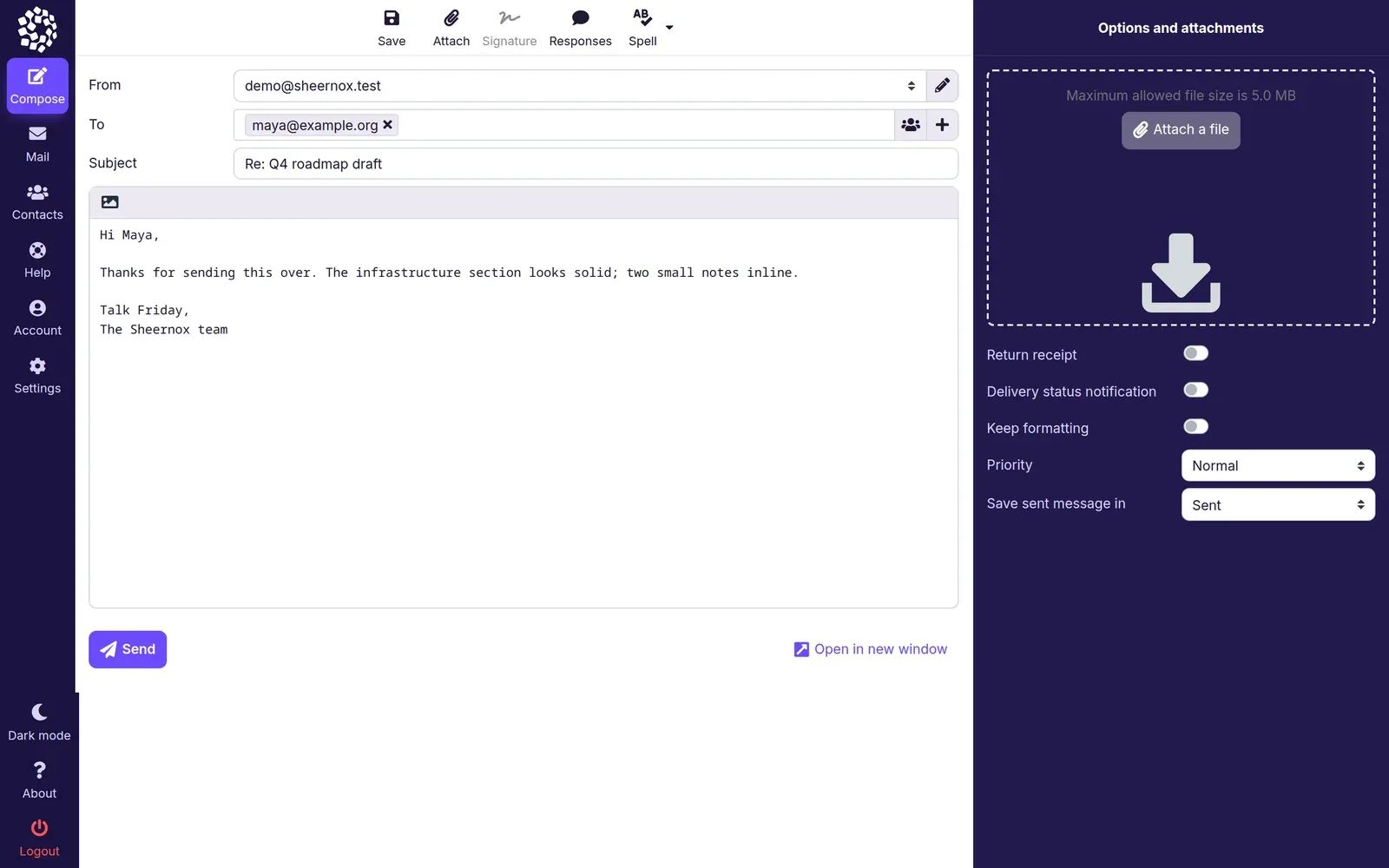
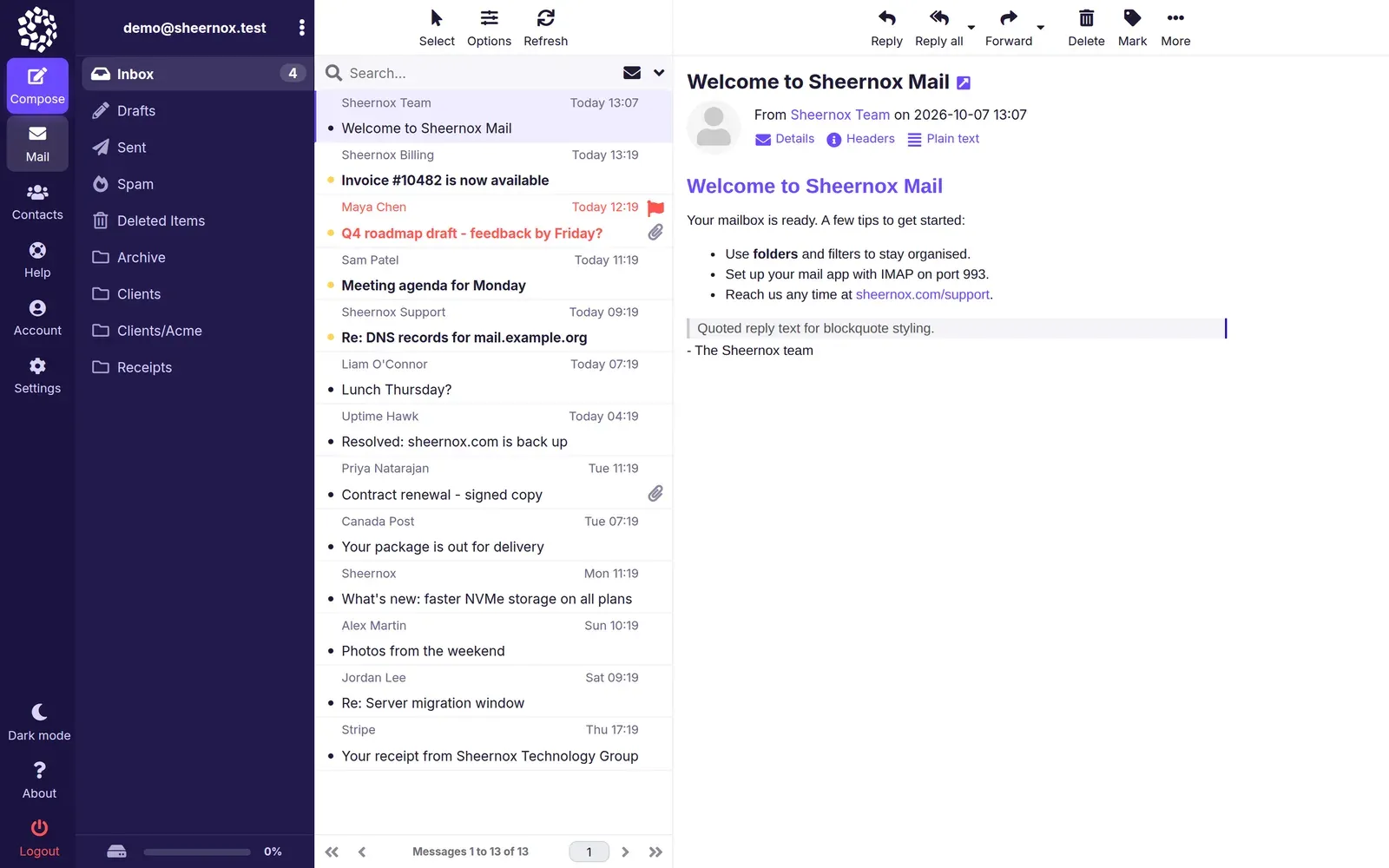
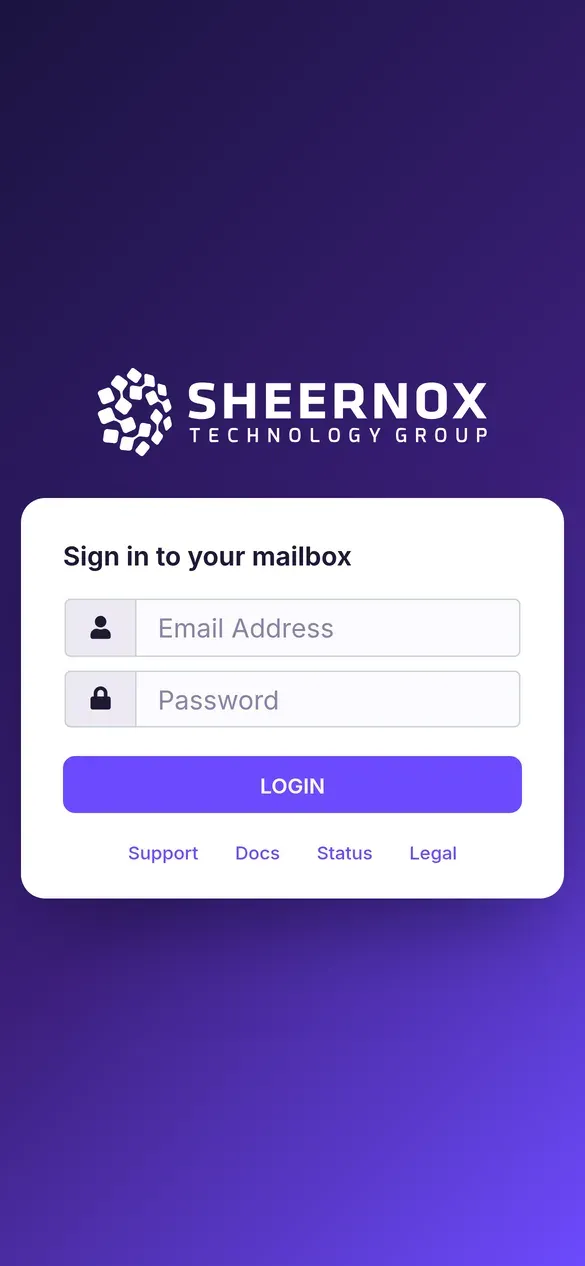
Sheernox Mail is the webmail included with every plan. Read, write, and organise mail on a desktop, a tablet, or your phone, with nothing to install.
- Three-pane desktop layout with folders, message list, and reading pane.
- Compose with attachments, signatures, and saved responses.
- Phone-ready layout with a floating compose button.
- Synced over IMAP with Outlook, Apple Mail, and your phone.

Every Address on Your Own Domain
sales@, info@, and you@ all land where they should.
Give each person a mailbox, add unlimited forwarders, and turn on a catch-all so a mistyped address still reaches you. Each extra mailbox costs only a small monthly fee.
- Alex Martinalex@
- Priya Shahpriya@
- Jordan Leejordan@
Your Webmail, Your Look
Custom-Branded Webmail swaps the Sheernox look for yours, so clients and staff see your company every time they sign in. It is a paid add-on, not part of any email plan; contact us for pricing.
- Your logo and brand colours on the sign-in page and inside the mailbox
- Your own webmail address, such as webmail.yourcompany.ca
- Sign-in page links to your own support, docs, and policies
- Set up by our team and kept working through every webmail upgrade
Everything You Need for Business Email
Built on the Enhance control panel with Postfix, Dovecot, and Rspamd, a proven open-source mail stack, and Roundcube webmail on top.
Your Domain, Your Address
Send from you@yourcompany.ca instead of a free Gmail or Hotmail address. Clients see your name on every quote, invoice, and reply.
Spam and Phishing Filtering
Rspamd checks every incoming message against sender reputation, DNS blocklists, and content rules, and keeps junk out of your inbox. Adjust spam settings for each mailbox in the control panel.
Works With Your Apps
Use Outlook, Apple Mail, Thunderbird, or the mail app on your iPhone or Android. IMAP keeps read, sent, and filed mail in sync on every device.
Roundcube Webmail
Read and send mail from any browser at mail.yourdomain, with folders, contacts, search, and a layout that works on phones.
Inbox-Ready Authentication
Your domain gets an SPF record from day one and DKIM signing with one click, the checks Gmail and Outlook run before they trust a sender.
Encrypted Connections
Webmail runs over HTTPS with a free SSL certificate, and IMAP, POP3, and SMTP connect over SSL/TLS on standard secure ports.
Land in the Inbox, Not the Junk Folder
Gmail, Yahoo, and Outlook.com now require SPF, DKIM, and DMARC from bulk senders and use the same checks to judge everyone else. Sheernox publishes your SPF record, signs outgoing mail with DKIM, and adds a DMARC policy we can tighten from monitoring to quarantine or reject when you are ready.
- SPF Published
- DKIM Signing
- DMARC Policy
- TLS Encryption
Why Businesses Choose Sheernox Email
Private, predictable email backed by our Canadian support team.
Hosted in Canada
Mailboxes are stored on servers in our Beauharnois, Quebec datacenter, near Montreal.
No Ads, No Profiling
You pay for hosting, so your inbox is not the product. We show no ads and build no profiles; automated filtering checks mail only to stop spam.
One Pool, Low Per-Mailbox Price
Each plan includes one shared storage pool and your first mailbox. Add a mailbox for each new hire at a small monthly price, and use unlimited forwarders so sales@ or info@ never need a mailbox of their own.
Free Migration
On every plan, we copy your mailboxes, folders, and messages from Gmail, Microsoft 365, cPanel, or another host, and time the switch so no mail is lost.
Support Around the Clock
Get help with Outlook setup, phone sync, and DNS by phone or ticket, 24/7.
Restore Mail Yourself
Daily backups include your email, and you can restore a mailbox from the control panel without waiting on a ticket.
Set Up in Four Steps
From choosing a plan to sending your first email from your own domain.
Pick a Plan
Choose the storage pool your team needs, then set how many mailboxes share it. You can add mailboxes or move up a plan later.
Connect Your Domain
Register a new .ca or .com with us, or point your existing domain's MX records. When we host your DNS, SPF and DKIM records are added for you.
Create Mailboxes
Add mailboxes, forwarders, a catch-all, and out-of-office replies in the Enhance control panel, and set each mailbox's size.
Connect Your Devices
Sign in to webmail right away, or add the account to Outlook, Apple Mail, or your phone using the settings shown in the control panel.
Moving from another provider?
Every plan includes free migration. Tell us where your mail is today and which mailboxes to bring; we copy your messages and folders, then switch your MX records at a time that suits you, so nothing is lost in between.
Tips for Professional Email Addresses
A good address is easy to say over the phone, easy to type, and stays consistent as your team grows.
Pick One Format for Everyone
Choose first.last@ or first@ and use it for every employee. A consistent pattern lets clients guess the right address.
Publish Role Addresses
Share info@, sales@, and billing@ instead of personal addresses. When staff change, the address stays; you only change where it forwards.
Skip Numbers and Nicknames
mike.chen@ reads as a business; mikey_99@ reads as a personal account. Save nicknames for internal chat.
Forward Instead of Adding Mailboxes
accounting@ or press@ rarely needs its own inbox. Forward it to the person who handles it and keep one place to check.
Keep the Domain Short
A short, easy-to-spell domain means fewer typos and bounced replies. If your .com is long, a matching .ca can be easier to share.
Protect Every Mailbox
Give each mailbox a long, unique passphrase and change it from webmail if you suspect a leak. Reused passwords are a common way business mailboxes get taken over.
Need More Than Email? Google Workspace
Sheernox Email is email, done well. Google Workspace is a complete office suite, and we set it up and look after it for you as a managed service. Pick the one that fits how your team works.
Sheernox Email
- Email only: webmail plus IMAP for Outlook, Apple Mail, and phones
- Stored in our Beauharnois, Quebec datacenter
- One shared storage pool per plan and a low price per mailbox
- Order online, with 30% off your first term
Google Workspace, Managed by Sheernox
- A full suite: Gmail, Calendar, Meet, Drive, Docs, and Chat
- Set up, managed, and supported by our Canadian team
- Runs in Google's data centres
- Priced per user and billed monthly on your Sheernox invoice
Google Workspace, Managed by Sheernox
You get Google's tools without the admin work. Our team sets everything up, looks after your users, and is your first call when something goes wrong.
Set Up for You
We create your Google Workspace account, verify your domain, and publish the MX, SPF, DKIM, and DMARC records Google needs.
Users and Licences Handled
Ask us to add or remove people, change editions, or reset a password, and we do the admin work in Google for you.
Support From Our Team
Open a ticket with our Canadian support team, or call our 24/7 line to log one. We troubleshoot with you and handle any escalation to Google.
One Canadian Invoice
Workspace licences appear on your Sheernox invoice in CAD, next to your domains and hosting.
Managed Google Workspace Editions
Every edition includes setup, user management, and support from our Canadian team. Priced per user and billed monthly; tell us how many people you have and we will handle the rest.
Business Starter
For teams that mainly need email, calendars, and video calls.
Contact us for pricingQuoted per user, billed monthly
Set up and supported by Sheernox
- Gmail on your domain
- 30 GB pooled storage per user
- Google Meet for up to 100 participants
- Docs, Sheets, Slides, and Drive
- Gemini in Gmail
Business Standard
For teams that share files and record meetings every day.
Contact us for pricingQuoted per user, billed monthly
Set up and supported by Sheernox
Everything in Business Starter, plus:
- 2 TB pooled storage per user
- Meet recording and noise cancellation, up to 150 participants
- Appointment booking and eSignature
- Gemini across Gmail, Docs, and more
Business Plus
For organizations with retention, legal hold, or device rules.
Contact us for pricingQuoted per user, billed monthly
Set up and supported by Sheernox
Everything in Business Standard, plus:
- 5 TB pooled storage per user
- Vault for retention and eDiscovery
- Advanced endpoint management
- Meet attendance tracking, up to 500 participants
Quoted per user and billed monthly. Promotions and the first-term discount do not apply to Google Workspace. Google Workspace is provided by Google under its own terms.
Frequently Asked Questions
Setup, migration, devices, and billing for Sheernox business email.
What is business email hosting?
It gives you addresses on your own domain, like you@yourcompany.ca, instead of a free @gmail.com or @outlook.com address. You control the mailboxes, storage, and forwarding, and the address stays yours when staff or providers change.
How is this different from free Gmail or Outlook.com?
Free accounts put another company's name in your address and are funded by advertising. Sheernox email uses your domain, shows no ads, and comes with 24/7 support by phone or ticket from a Canadian team.
Should I choose Sheernox Email or Google Workspace?
Choose Sheernox Email for reliable email on your domain, stored in Canada, with one shared storage pool and a low price per mailbox. Choose Google Workspace if your team depends on shared calendars, video meetings, and cloud documents. We offer both: Sheernox Email is ordered online, and our team sets up Google Workspace, so contact us for it. If you use Microsoft 365, we can point your domain's MX records to it.
Do I need a website to use email hosting?
No. You only need a domain. Email works without a website, and you can add web hosting to the same domain later.
Which apps and devices can I use?
Any app that supports IMAP or POP3, including Outlook, Apple Mail, Thunderbird, and the built-in mail apps on iPhone and Android. Webmail works in any modern browser, and the control panel shows the exact server settings for each mailbox.
Where is my email stored, and who can read it?
On servers in our Beauharnois, Quebec datacenter. Connections are encrypted with SSL/TLS, we never show ads or sell your data, and automated filtering checks mail only to block spam. The Privacy Policy on legal.sheernox.com lists the service providers we use.
What spam protection is included?
Every mailbox is filtered by Rspamd, which checks sender reputation, DNS blocklists, SPF and DKIM results, and message content to catch spam and phishing. You can adjust the spam settings for each mailbox in the control panel.
Can you move my existing email?
Yes. Migration is free on every plan. We copy mailboxes, folders, and messages from Gmail, Microsoft 365, cPanel, Plesk, or any provider with IMAP access, then help you switch MX records at a quiet time so no mail is lost.
What is the difference between a mailbox, a forwarder, and a catch-all?
A mailbox has its own login and storage. A forwarder, such as sales@, has no storage and delivers to one or more mailboxes. A catch-all receives mail sent to any address on your domain that does not exist. Forwarders are unlimited on every plan.
Should I use IMAP or POP3?
Use IMAP. It keeps mail on the server and in sync on every device. POP3 downloads mail to one computer and usually removes it from the server. Both are included on every plan.
Can I send newsletters or bulk email?
Sheernox email is built for everyday business mail. Outgoing mail is rate-limited to protect deliverability for every customer, so send marketing lists through a dedicated newsletter service.
Is there an uptime guarantee or refund window?
Yes. Every plan is covered by our 99.9% monthly uptime SLA, and email hosting can be refunded within 30 days of your initial order. Both are set out on legal.sheernox.com.
How does the shared storage pool work?
Each plan has one pool of storage that all its mailboxes share: 25 GB on Starter, 250 GB on Business, and 2.5 TB on Enterprise. Each mailbox can grow up to its plan limit (5, 30, or 100 GB), and you can set a smaller size for any mailbox in the control panel. Plans hold up to 25, 50, or 250 mailboxes.
Do prices go up at renewal?
Your first term is 30% off the whole order, extra mailboxes included: the first year on annual billing, or the first month on monthly billing. Plans then renew at the regular price shown on each card. Google Workspace is billed monthly at the per-user price we quote, with no first-term discount.
Get Professional Email on Your Domain
Start with any plan, bring your existing mail with free migration, and get help from our Canadian support team whenever you need it.